by

A practical spare parts inventory management process helps a facilities team find the right component when it is needed without filling the storeroom with items that rarely move. The goal is not to stock everything. It is to understand what turns over quickly, what is critical despite infrequent use, and when purchasing needs to start.
A building’s stock may include lamps, batteries, filters, seals, taps, cleaning materials, and safety or operating supplies. These are different from long-life assets recorded as equipment or units: inventory covers consumables and spare parts that arrive, are stored, and are issued for day-to-day work.
Classify fast movers, slow movers, and critical parts
Start with a consistent item list: name and code, unit of measure, storage location, supplier, lead time, and quantity on hand. Usage records from previous periods help reveal how often each item moves. Define fast- and slow-moving stock from the building’s own pattern, then review the classification rather than treating it as permanent.
Fast movers are used regularly, such as common lamp types or cleaning products. Slow movers may include a specialist part for one pump model. Add a criticality check: a low-frequency item may still be essential if its absence interrupts service or replacement takes a long time. “Rarely issued” does not automatically mean “safe to remove.”
Group stock by location and specification as well. Similar-looking components may not be interchangeable, so confirm type, size, and equipment compatibility before setting minimum quantities. Keep damaged, expired, or obsolete items separate from usable stock so the physical count reflects what the team can actually use.
Set min–max levels and a reorder point
A min–max approach gives each item a lower and upper stock limit. When quantity reaches the minimum, the team orders enough to replenish it toward the agreed maximum. The upper limit helps prevent large repeat purchases that ignore storage space, shelf life, and actual consumption.
The reorder point answers when to start buying. A common starting formula is average demand during supplier lead time plus safety stock. For example, if a filter averages four units a week and delivery takes two weeks, demand during lead time is about eight units. Add a sensible buffer based on usage variation and supplier delays; this is an illustration, not a universal setting for every building.
Keep the reorder point separate from the order quantity: the first determines timing, while min–max helps determine how much to replenish. Consider purchasing schedules, supplier minimums, storage capacity, and local availability. NetSuite’s reorder-point guide explains how usage rate, lead time, and safety stock inform the calculation; use building-specific data for the inputs.
Record every issue and assign ownership
On-hand balances are useful only when transactions are updated as stock moves. Record receipts, issues, returns, transfers, and damaged or discarded items. An issue record should ideally include the date, item, quantity, work order or destination area, and the person who collected it. That makes unusual usage easier to trace and future demand easier to estimate.
Decide who may collect stock, who records movements, and who approves adjustments. In a small team, one person may hold more than one role, but separate recording and periodic checks when practical. Use consistent item codes and units—for example, “each” or “pack”—so different package sizes are not counted as if they were the same unit.
Schedule physical counts, checking fast-moving or high-impact items more often. Compare the count with the record, investigate differences, and document corrections with a reason. A stocktake can uncover unit errors, damaged goods, duplicate codes, and items that have not moved for a long time. business.gov.au’s inventory guidance also covers current records, reorder points, regular stocktakes, and reviewing results.
Keep stock separate from asset registers and maintenance plans
An asset register answers “what equipment do we own, and where is it?” Spare-parts inventory answers “what is available, how much is on hand, and when should it be replenished?” The two records can inform each other, but they are not the same job. Inspections and preventive maintenance check condition or schedule work; they do not replace stock-movement records.
Review slow movers periodically: are they still needed, compatible with equipment still in service, and worth storing? Do not automatically discard an item simply because it has been still for a few months. Consider the impact of not having it and the lead time for a replacement. Stock has carrying and obsolescence costs, while a stockout can trigger urgent purchasing; CIPS outlines both sides of inventory cost.
Start with a list the team will actually use
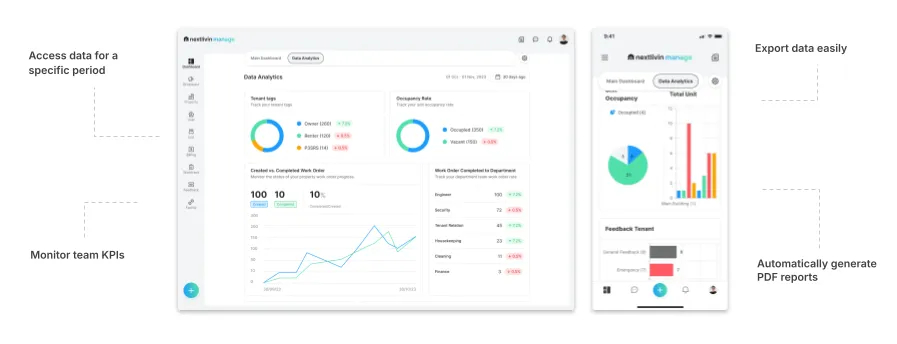
Test the process in one storeroom or item group, then adjust minimums, maximums, and reorder timing against real use. Nextlivin lists inventory features for tracking and updating stock, usage, and work history. Explore Nextlivin’s property-management features or team data and collaboration tools for the platform context; these tools do not replace a building’s stock policy or physical checks.
Healthy inventory is not a full storeroom. It is a trustworthy record and a simple process the team understands. Classifying movement and criticality, setting realistic reorder points, recording each issue, and auditing regularly can support operational readiness while reducing overbuying.